User key & configuration commands
ADD USER KEY
Request APDU (encrypted)
CLA |
INS |
P1 |
P2 |
LC |
Data |
|---|---|---|---|---|---|
|
|
|
|
var |
MAC | Encrypted data |
Preconditions: Secure Channel must be opened.
This command registers a user public key in one of three slots. User keys provide an alternative authentication mechanism to the PIN: instead of typing a numeric code, the user proves identity by signing a challenge or a transaction hash with their private key. This enables integration with hardware security modules like iOS Secure Enclave, PC TPMs, or external FIDO authenticators.
Each slot accepts a different key type, and once a key is written to a slot, it must be deleted with DELETE USER KEY before a new key can be stored in the same slot. The key is accompanied by a 64-byte free-text description that can be read back with the READ DATA command (P1=slot index, P2=0).
Request Data — Slot 1 (EC 256r1, plaintext) — 142 bytes
Slot 1 stores an EC secp256r1 public key in X9.62 uncompressed format. This is the standard NIST P-256 curve, widely supported by secure enclaves and TPMs.
Field |
Size |
Description |
|---|---|---|
Slot index |
1B |
|
Info text |
64B |
User-defined description (fixed 64 bytes, padded if shorter) |
Public key |
65B |
EC 256r1 uncompressed ( |
PUK |
12B |
PUK for authorization |
Request Data — Slot 2 (RSA 2048, plaintext) — 333 bytes
Slot 2 stores a 2048-bit RSA public key. Only the modulus is transmitted; the public exponent
is fixed at 65537 (0x010001) and is not sent.
Field |
Size |
Description |
|---|---|---|
Slot index |
1B |
|
Info text |
64B |
User-defined description (fixed 64 bytes) |
RSA modulus |
256B |
2048-bit modulus, big-endian. Exponent must be 65537. |
PUK |
12B |
PUK for authorization |
Note
RSA commands require the extended frame format header, as the payload exceeds 256 bytes.
Request Data — Slot 3 (FIDO, plaintext) — variable
Slot 3 is a special slot designed for FIDO2/WebAuthn authenticators. In addition to the EC public key, it stores the FIDO credential identifier, which is needed by the host to request an assertion from the external authenticator during the CHECK USER KEY flow.
Field |
Size |
Description |
|---|---|---|
Slot index |
1B |
|
Info text |
64B |
User-defined description (fixed 64 bytes) |
CredID length |
1B |
Length of credential ID (up to 64) |
CredID |
1-64B |
FIDO credential identifier |
EC public key |
65B |
EC 256r1 uncompressed ( |
PUK |
12B |
PUK for authorization |
Status Words
SW |
Description |
|---|---|
|
Success |
|
Invalid slot index |
|
Incorrect data length |
|
PIN not provided |
|
Invalid public key |
|
Slot already has a key (delete first) |
Note
For the current implementation, EC public keys are not tested for point-on-curve validity when saved. On JCOP 4 platforms, the underlying hardware performs this validation implicitly during cryptographic operations.
CHECK USER KEY
Request APDU (encrypted)
CLA |
INS |
P1 |
P2 |
LC |
Data |
|---|---|---|---|---|---|
|
|
Mode |
|
var |
MAC | Encrypted data |
Preconditions: Secure Channel must be opened.
This command authenticates the user using a public key previously registered with ADD USER KEY. A successful user key authentication is equivalent to a PIN verification. There are two distinct authentication modes, serving different purposes:
Auth for Sign (P1=0x00 or P1=0x10): The user signs the transaction hash(es) to authorize a subsequent
SIGNcommand. The card verifies the signature and, on success, unlocks theSIGNcommand for exactly those hash(es).Challenge-Response (P1=0x01 then P1=0x02): The user requests a random challenge from the card, signs it with their private key, and sends the signature back. On success, this unlocks all commands that normally require PIN (except
SIGN).
Important
The card cannot be simultaneously unlocked for “PIN” commands and for SIGN. When the PIN
is not used, management commands must be unlocked via challenge-response (P1=1/2), then
the SIGN must be unlocked separately via auth-for-sign (P1=0/0x10).
P1=0x00 — Auth for Sign (single hash)
Field |
Size |
Description |
|---|---|---|
Slot index |
1B |
|
Hash |
32B |
Transaction hash to authorize |
Signature |
var |
EC 256r1 ASN.1 DER (slot 1/3) or RSA 2048 PKCS#1 (slot 2) |
On success (response = 0x01), the SIGN command is unlocked for this specific hash only.
P1=0x10 — Auth for Sign (hash list)
When multiple transactions need to be signed in one session, this mode accepts a list of up to 4 hashes (or 3 for FIDO slot). The signed message includes a count byte followed by the concatenated hashes.
Field |
Size |
Description |
|---|---|---|
Slot index |
1B |
|
Hash count |
1B |
Number of hashes (1–4, or 1–3 for FIDO) |
Hash list |
n x 32B |
Hashes to authorize (32B each) |
Signature |
var |
EC 256r1 ASN.1 DER (slot 1/3) or RSA 2048 PKCS#1 (slot 2) |
P1=0x01 — Challenge Request
No data required (or MAC only). The card generates a random 256-bit nonce and returns it. This challenge must then be signed by the user and submitted with P1=0x02.
Response Data — 32 bytes
Field |
Size |
Description |
|---|---|---|
Challenge |
32B |
Random 256-bit nonce |
P1=0x02 — Challenge Response
The user submits the signed challenge to prove they hold the private key. The hash is not included in the data because the card uses the challenge it generated internally.
Field |
Size |
Description |
|---|---|---|
Slot index |
1B |
|
Signature |
var |
Signature of the challenge (hash is provided by card internally) |
On success (response = 0x01), this unlocks commands requiring PIN (except SIGN).
P1P2=0x0301 — Read FIDO Credential ID
Returns the credential ID associated with the FIDO user key slot (slot 3), which the host needs to request an assertion from the external FIDO authenticator.
Response Data:
Field |
Size |
Description |
|---|---|---|
CredID length |
1B |
Length of credential ID |
CredID |
var |
FIDO credential identifier |
FIDO Registration and Authentication Flow
The following diagram illustrates the complete FIDO2 user registration and authentication flow between the external FIDO authenticator, the host PC, and the wallet card:
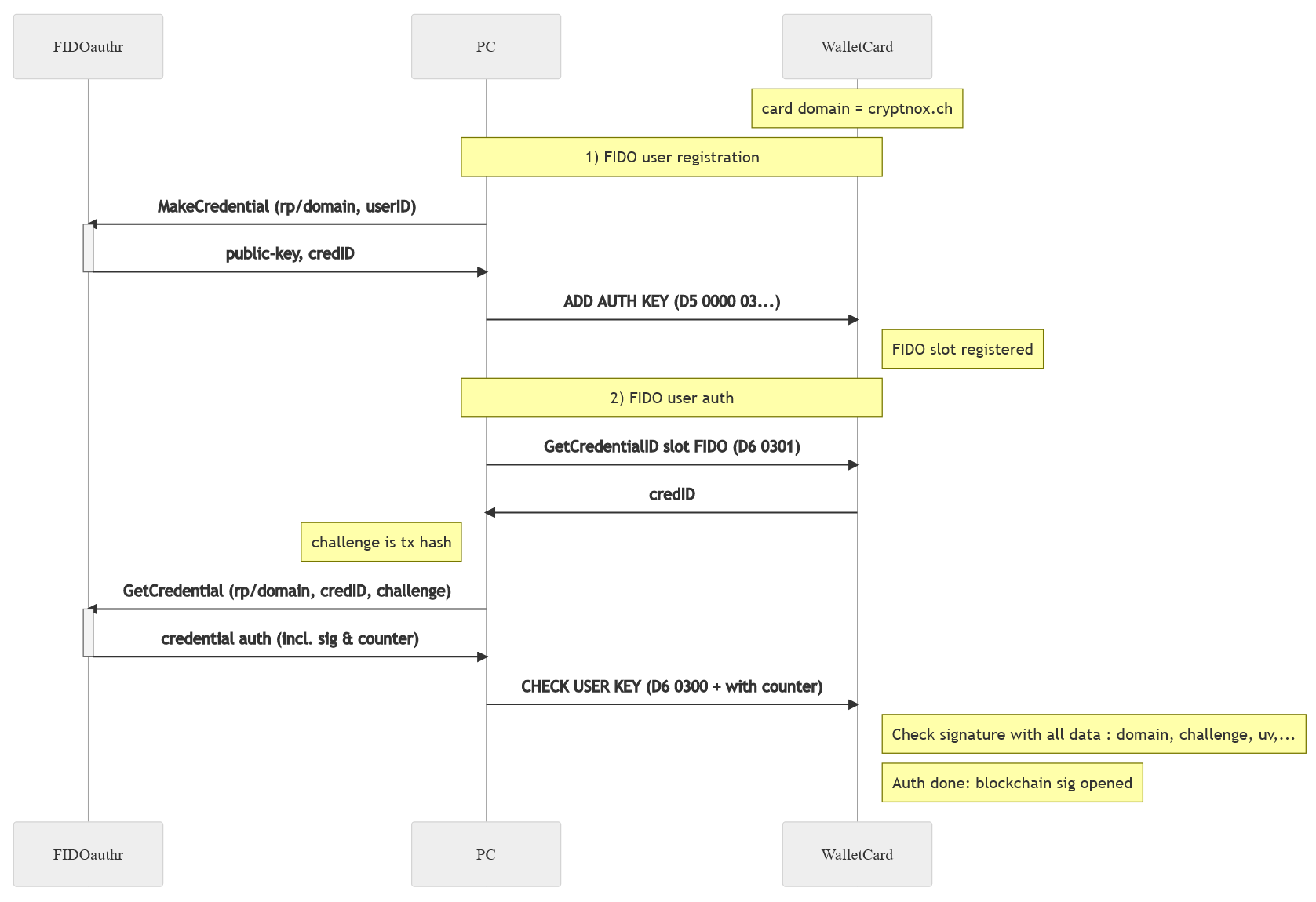
FIDO2 user registration (ADD USER KEY) and authentication (CHECK USER KEY) sequence.
FIDO Signature Format (Slot 3)
When slot 3 is used for auth-for-sign or challenge-response, the data format differs from EC/RSA slots because it must include the FIDO monotonic counter. The card verifies the signature as a WebAuthn “user verified” assertion:
sha256(rp_id) | 0x05 | counter | sha256(clientData)
Where rp_id = "cryptnox.ch" and clientData is a fixed JSON template:
{
  "type": "webauthn.get",
  "origin": "https://cryptnox.ch",
  "challenge": "<base64url-encoded hash>",
  "clientExtensions": {}
}
FIDO auth-for-sign data format:
Field |
Size |
Description |
|---|---|---|
Hash(es) |
32-97B |
Transaction hash(es) to authorize |
Counter |
4B |
FIDO monotonic counter |
EC signature |
var |
EC 256r1 ASN.1 DER |
FIDO challenge-response data format (P1=0x02):
Field |
Size |
Description |
|---|---|---|
Counter |
4B |
FIDO monotonic counter |
EC signature |
var |
EC 256r1 ASN.1 DER |
The FIDO slot is limited to 3 hashes (instead of 4) when using the hash-list mode (P1=0x10).
Response Data (all modes except Challenge Request and CredID read) — 1 byte
Field |
Size |
Description |
|---|---|---|
Result |
1B |
|
Note
A return value of 0x00 with status 0x9000 means the signature was not properly verified:
either the signature is invalid or the user key for this slot was not initialized. After a
failed challenge attempt, a new challenge must be requested (P1=1) before retrying (P1=2).
Status Words
SW |
Description |
|---|---|
|
Success (check result byte for verification outcome) |
|
Invalid slot index or incorrect data |
|
FIDO key not registered (CredID read), or P1=2 sent before P1=1, or challenge expired (power cycle/deselect) |
DELETE USER KEY
Request APDU (encrypted)
CLA |
INS |
P1 |
P2 |
LC |
Data |
|---|---|---|---|---|---|
|
|
|
|
var |
MAC | Encrypted data |
Preconditions: Secure Channel must be opened.
Deletes the user public key from the specified slot. Once a key has been written to a slot with ADD USER KEY, it cannot be overwritten directly — it must first be deleted with this command. The PUK is required for authorization, providing an additional layer of protection against unauthorized key removal.
Request Data (plaintext) — 13 bytes
Field |
Size |
Description |
|---|---|---|
Slot index |
1B |
|
PUK |
12B |
PUK for authorization |
Status Words
SW |
Description |
|---|---|
|
Success |
|
Invalid slot index |
|
Data length not 13 bytes |
|
Wrong PUK (x = remaining tries before power cycle) |
|
Slot is empty (nothing to delete) |
SET PINLESS PATH
Request APDU (encrypted)
CLA |
INS |
P1 |
P2 |
LC |
Data |
|---|---|---|---|---|---|
|
|
|
|
var |
MAC | Encrypted data |
Preconditions: Secure Channel opened, seed or extended key loaded.
This command enables the pinless signing feature, which allows the SIGN command to be executed
without PIN authentication or even a secure channel. This is specifically designed for contactless
(NFC) payment transactions where typing a PIN is impractical, such as tap-and-pay at a point of
sale.
For security, the pinless path is restricted to a BIP32 derivation path that must begin with the
EIP-1581 prefix m/43'/60'/1581'. EIP-1581 defines a purpose path for non-wallet usage of keys,
providing a clear segregation between pinless keys and standard PIN-protected wallet keys.
Despite this naming, the keys can still be used for wallet transactions — the path restriction
is purely a security boundary.
The path must be at least 3 levels deep and at most 8 levels. It is provided as raw 32-bit
big-endian integers, 4 bytes per level, in the same format as the DERIVE KEY command.
This feature only supports the K1 (secp256k1) key pair.
Request Data — Enable pinless (plaintext)
Field |
Size |
Description |
|---|---|---|
PUK |
12B |
PUK for authorization |
Path elements |
12-32B |
3-8 levels x 4 bytes (32-bit big-endian) |
Path must start with m/43'/60'/1581' (EIP-1581 prefix):
0x8000002B | 0x8000003C | 0x8000062D | ...
Request Data — Disable pinless (plaintext)
To disable the pinless feature, send the command with only the PUK and no path data. The PUK verification still applies.
Field |
Size |
Description |
|---|---|---|
PUK |
12B |
PUK for authorization (no path = disable) |
Status Words
SW |
Description |
|---|---|
|
Success |
|
Wrong PUK (x = remaining tries before power cycle) |
|
Data length not a multiple of 4, or path not between 12 and 32 bytes |
|
Path doesn’t start with EIP-1581 prefix ( |
|
No seed or extended key loaded (checked before PUK) |
SET PIN AUTH
Request APDU (encrypted)
CLA |
INS |
P1 |
P2 |
LC |
Data |
|---|---|---|---|---|---|
|
|
|
|
var |
MAC | Encrypted data |
Preconditions: Secure Channel must be opened.
This command controls whether PIN-based authentication is allowed. By default, both PIN and user key authentication are available. Disabling PIN auth forces the user to authenticate exclusively through the CHECK USER KEY mechanism (EC/RSA/FIDO signatures).
This is useful in high-security deployments where a numeric PIN is considered insufficient and all authentication must go through a hardware key (Secure Enclave, TPM, FIDO authenticator).
When disabling PIN auth (status byte > 0), the card verifies that at least one user public key
has been registered; otherwise it returns 0x6986. This prevents accidentally locking the user
out of the card.
To re-enable PIN auth, call this command with the status byte set to 0x00.
Request Data (plaintext) — 13 bytes
Field |
Size |
Description |
|---|---|---|
Status |
1B |
|
PUK |
12B |
PUK for authorization |
Status Words
SW |
Description |
|---|---|
|
Success |
|
Wrong PUK (x = remaining tries before power cycle) |
|
Data length is not 13 bytes |
|
Disable requested but no user public key loaded |
SET PUB EXPORT
Request APDU (encrypted)
CLA |
INS |
P1 |
P2 |
LC |
Data |
|---|---|---|---|---|---|
|
|
Feature |
|
var |
MAC | Encrypted data |
Preconditions: Secure Channel opened, seed loaded.
This command controls two independent public key export features. Both are disabled by default from factory and after every card reset, ensuring that public key data is not accidentally exposed.
P1=0x00 — Extended public key (xpub) export
Enables or disables the ability to read extended public keys (BIP32 xpub) via the GET PUBKEY command with P2=0x02. The xpub contains the chain code and is sufficient to derive all child public keys at that level and below, making it a sensitive piece of data that allows address enumeration.
P1=0x01 — Clear public key reading (without PIN or SC)
Enables or disables the ability to read the current public key without PIN verification or even a secure channel. This is designed for point-of-sale scenarios where a reader needs to identify the card’s payment address via a simple NFC tap. When enabled, the public key can be read by anyone with physical access to the card.
P1 values
P1 |
Description |
|---|---|
|
xpub export capability |
|
Clear public key reading (without PIN or SC) |
Request Data (plaintext) — 13 bytes
Field |
Size |
Description |
|---|---|---|
Status |
1B |
|
PUK |
12B |
PUK for authorization |
Status Words
SW |
Description |
|---|---|
|
Success |
|
Wrong PUK (x = remaining tries before power cycle) |
|
Data length is not 13 bytes |
|
No seed or extended key loaded |
|
P1 is not 0 or 1 |