cryptnox-sdk-esp32
ESP32 SDK for managing Cryptnox smart card wallets




cryptnox-sdk-esp32 is an ESP-IDF component bundle that enables the use of Cryptnox Smart cards on ESP32-family platforms. It provides secure communication with the card, retrieves card information, and exposes basic cryptographic operations through the shared C++ core SDK.
Supported hardware
Cryptnox Hardware Wallet smart cards
Works with Cryptnox Hardware Wallet smart cards running firmware v1.6.0 or later.
NFC readers
Host board
| Board | MCU | Notes |
| ESP32-S3-DevKitC-1 | ESP32-S3-WROOM-1 | Official Espressif dev kit — wire PN532 with jumpers to the 2×22-pin headers |
Installation
- Install ESP-IDF v5.5 following the official guide.
- Clone this repository with submodules (the C++ core SDK is a submodule):
git clone --recurse-submodules https://github.com/cryptnox/cryptnox-sdk-esp32.git
- From the project root, set the target and build:
idf.py set-target esp32s3
idf.py build flash monitor
Hardware setup
- Attention
- Always double-check the wiring before powering the board to prevent damage.
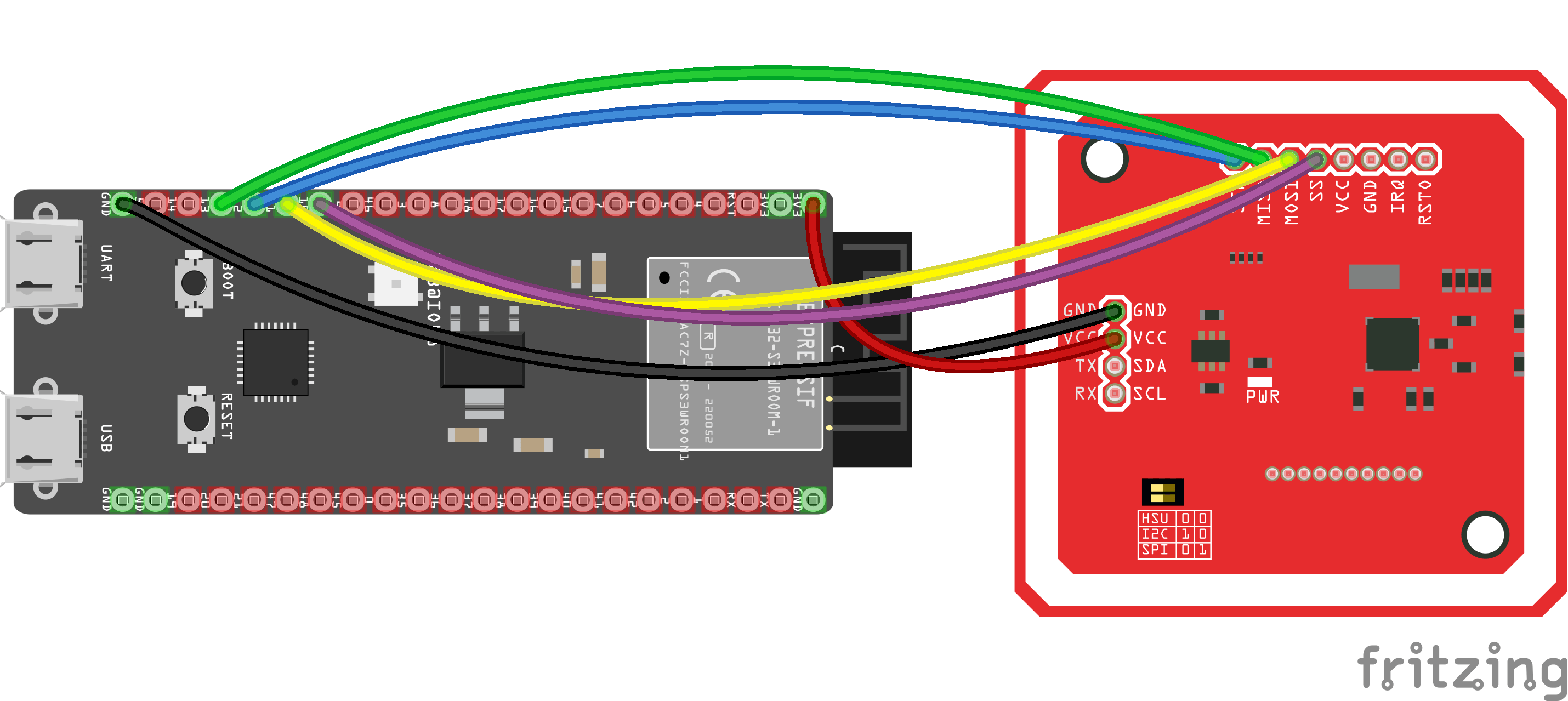
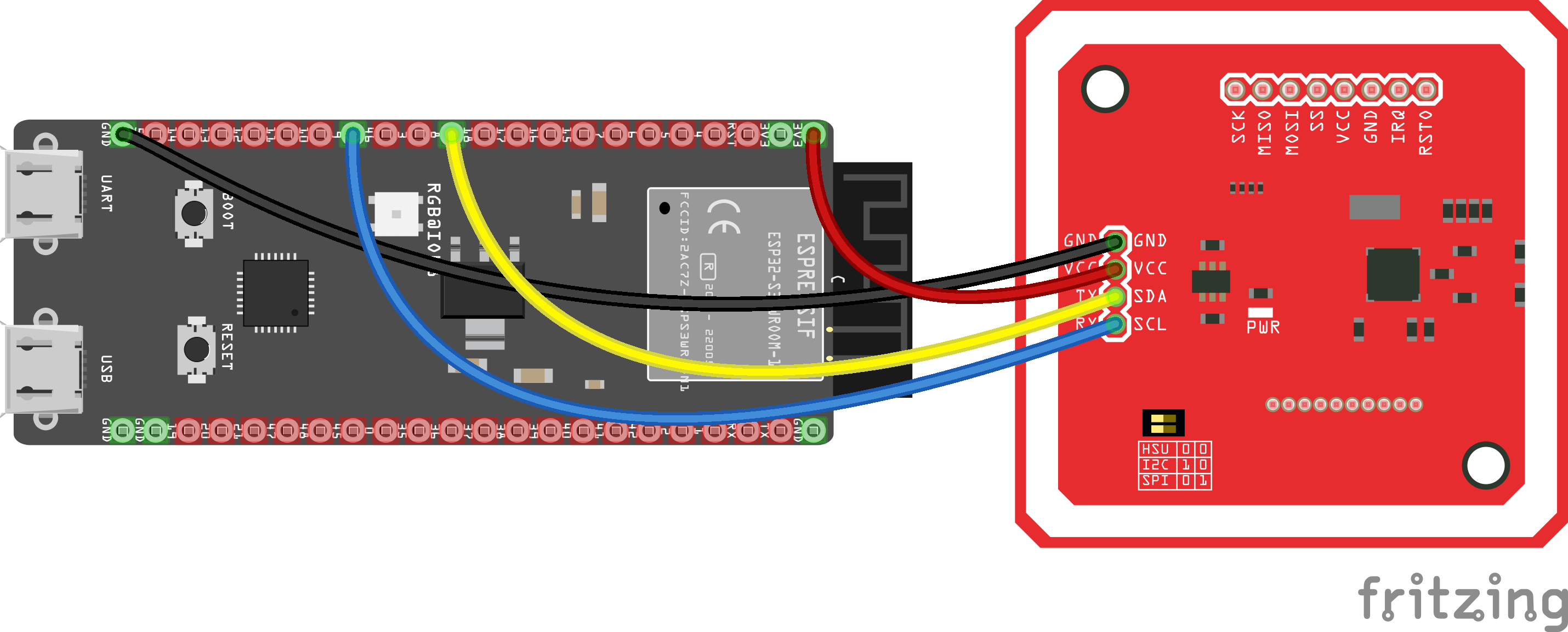
Wiring shown for the ESP32-S3-DevKitC-1.
ESP32-S3 and PN532 NFC — SPI interface
| PN532 Pin | ESP32-S3 GPIO | Wire Color |
| VCC | 3.3V | Red |
| GND | GND | Black |
| SCK | IO12 | Blue |
| MISO | IO13 | Green |
| MOSI | IO11 | Yellow |
| SS (CS) | IO10 | Violet |
- Important
- Make sure the switches on the PN532 module are configured for SPI mode:
- Switch 0 → HIGH
- Switch 1 → LOW
ESP32-S3 and PN532 NFC — I²C interface
| PN532 Pin | ESP32-S3 GPIO | Wire Color |
| VCC | 3.3V | Red |
| GND | GND | Black |
| SDA | IO8 | Yellow |
| SCL | IO9 | Blue |
| IRQ | IO20 | Violet |
| RST | IO21 | Grey |
- Important
- Make sure the switches on the PN532 module are configured for I²C mode:
- Switch 0 → LOW
- Switch 1 → HIGH
Quick usage examples
All examples assume the shared SPI bus has been initialised and the three adapters (ESP32Logger, ESP32CryptoProvider, ESP32Pn532Transport) are wired into a CryptnoxWallet. Helper macros are used for brevity; see examples/UsdcSigning/ for the full ESP-IDF boilerplate.
1. Connect to a Cryptnox card
#include "CryptnoxWallet.h"
#include "esp32_pn532_transport.h"
#include "esp_log.h"
static const char *
TAG =
"main";
ESP32Pn532Transport transport(SPI2_HOST, 10);
CryptnoxWallet wallet(transport, logger, crypto);
if (!wallet.begin()) {
ESP_LOGE(
TAG,
"Reader not found");
return;
}
CW_SecureSession session;
if (!wallet.connect(session)) {
ESP_LOGE(
TAG,
"Card not detected or secure channel failed");
return;
}
CW_CardInfo info = {};
if (wallet.getCardInfo(session, info)) {
ESP_LOGI(
TAG,
"Card serial number: %s", info.serialNumber);
}
wallet.disconnect(session);
}
void app_main(void)
ESP-IDF application entry point.
CW_Logger implementation that writes to ESP32 UART0 via printf.
CW_CryptoProvider backed by mbedTLS and the ESP32 hardware TRNG.
CW_Logger backed by ESP32 UART0.
CW_CryptoProvider implementation for ESP32 using mbedTLS and the hardware TRNG.
static const char *const TAG
2. Verify the PIN code
The card must be initialised before calling verifyPin.
Security note: Never hard-code a PIN in firmware — read it from a secure source at runtime and wipe the buffer with CW_Utils::secure_wipe() immediately after use.
ESP32Pn532Transport transport(SPI2_HOST, 10);
CryptnoxWallet wallet(transport, logger, crypto);
wallet.begin();
CW_SecureSession session;
if (!wallet.connect(session)) {
ESP_LOGE(
TAG,
"Card not detected");
return;
}
uint8_t pin[CW_MAX_PIN_LENGTH] = { 0U };
uint8_t pinLength = 0U;
read_pin_from_secure_input(pin, &pinLength);
CW_PinResult res = wallet.verifyPin(session, pin, pinLength);
CW_Utils::secure_wipe(pin, sizeof(pin));
switch (res) {
case CW_PIN_OK:
ESP_LOGI(
TAG,
"PIN verified — card is ready for signing");
break;
case CW_PIN_INVALID:
ESP_LOGW(
TAG,
"Invalid PIN code");
break;
case CW_PIN_LENGTH_INVALID:
ESP_LOGW(
TAG,
"Invalid PIN length or PIN authentication disabled");
break;
case CW_PIN_LOCKED:
ESP_LOGW(
TAG,
"Card is locked — power-cycle the card");
break;
}
wallet.disconnect(session);
}
3. Sign a transaction hash
Signs a 32-byte digest (e.g. SHA-256 of a Bitcoin or Ethereum transaction) on the secp256k1 curve.
ESP32Pn532Transport transport(SPI2_HOST, 10);
CryptnoxWallet wallet(transport, logger, crypto);
wallet.begin();
CW_SecureSession session;
if (!wallet.connect(session)) {
ESP_LOGE(
TAG,
"Card not detected");
return;
}
const uint8_t hash[32] = { };
CW_SignRequest req(session,
CW_KEY_SECP256K1,
CW_SIG_ECDSA,
false);
req.hash = hash;
req.hashLength = sizeof(hash);
read_pin_from_secure_input(req.pin, NULL);
CW_SignResult sig = wallet.sign(req);
if (sig.errorCode == CW_SIGN_OK) {
ESP_LOGI(
TAG,
"Signature OK (64-byte r||s in sig.signature)");
} else {
ESP_LOGE(
TAG,
"Sign failed: 0x%02X", sig.errorCode);
}
wallet.disconnect(session);
}
See examples/UsdcSigning/ for a full reference that wires up the SPI bus and polls the PN532.
Security
- Flash Encryption and Secure Boot V2 must be enabled for production deployments. Defaults are set in sdkconfig.defaults. eFuse programming is irreversible — practice on a development board first.
- Hard-coded secrets: Never hard-code a PIN or private key in firmware. Wipe PIN buffers with CW_Utils::secure_wipe() immediately after use.
- Dependency pinning: Use the exact ESP-IDF tag (v5.5.0) and pin the cryptnox-sdk-cpp submodule to a commit hash.
Documentation
The generated documentation for this project is available here.
License
cryptnox-sdk-esp32 is dual-licensed:
- LGPL-3.0 for open-source projects and proprietary projects that comply with LGPL requirements
- Commercial license for projects that require a proprietary license without LGPL obligations (see COMMERCIAL.md for details)
For commercial inquiries, contact: contact@cryptnox.com

 1.15.0