
Check User Key
The Check User Key command verifies a stored user key and ensures it matches the provided authentication data. This command allows the system to check whether a registered EC256r1 or RSA 2048-bit public key is valid for authentication. It is primarily used to confirm the identity of a user without requiring a PIN, enabling secure transactions and operations.
To authenticate, the command takes a slot index (1-3) and a signed challenge (a cryptographic signature using the stored key). If the signature is correct, the key is considered valid, and the system unlocks certain functions, like signing blockchain transactions or authorizing sensitive commands. If the verification fails, the system returns an error, preventing unauthorized access.
For FIDO authentication, the command checks whether the stored FIDO key corresponds to a valid credential. In this case, it verifies the credential ID and public key against the provided signature. If successful, it allows FIDO-based authentication instead of using a PIN.
The Check User Key command ensures that only authorized users with the correct cryptographic keys can access secure features, reinforcing security by replacing PIN-based authentication with public key cryptography.
Command specifications
Check User Key Command
The Check User Key command is used to verify a stored user key and confirm it matches the provided authentication data. This command enables the system to determine whether a registered EC256r1 or RSA 2048-bit public key is valid for authentication. It plays a key role in confirming a user’s identity without needing a PIN, supporting secure transactions and operations.
Below is the Python object code snippet for the Check User Key command:
def add_user_key(slot_index: SlotIndex, data_info: str, public_key: bytes, puk: str, cred_id: bytes):
    card.user_key_add(slot_index, data_info, public_key, puk, cred_id)

For example,
user_key_info = check_user_key(SlotIndex.SLOT_1)
print(user_key_info)
Application Protocol Data Unit (APDU) Components
The following table outlines the components of the Application Protocol Data Unit (APDU).
Field | Description | Value |
CLA | This field specifies the class of the instruction. | 0x80 |
INS | This field specifies the particular command or operation that the smart card or secure element should execute. | 0xD6 |
P1 | First parameter of the instruction that specifies the details about the operation being requested. | 0/x10 or 1/2 (see additional information section for more details). |
P2 | Second parameter of the instruction that specifies additional details about the operation being requested. | 0x00 |
Data | Key Data | Slotindex (1-3)
|
Response
The following table outlines the possible responses that you will receive:
Response Code | Description |
0x9000 | Success or sig fail (!) |
0x63Cx | Invalid slot index or data input format. |
0x6986 |
|
📘 Response Data
- 0x00: Signature failure.
- 0x01: Success.
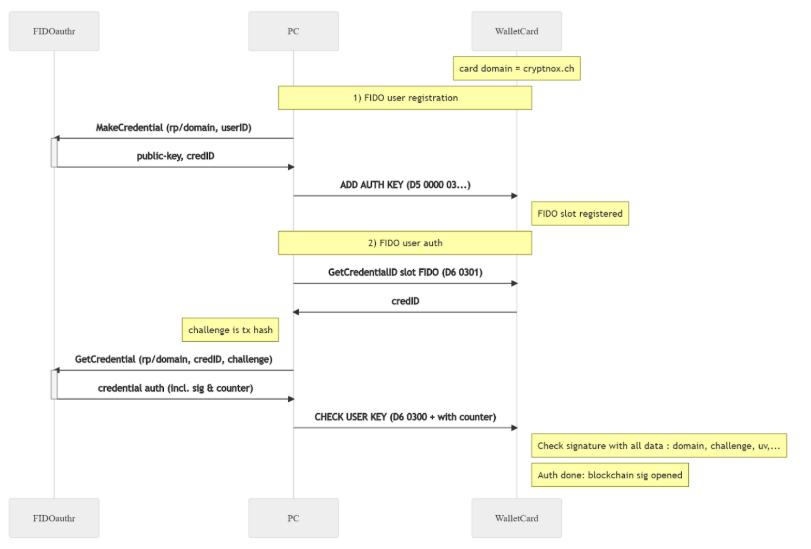
User Registration and Authentication with FIDO2
When using FIDO2 authentication, the challenge response method is used to unlock or authenticate the user, similar to a PIN. However, in this process (P1=2), the data input does not include a hash. Instead, it consists only of the counter (4 bytes) and an EC256r1 ASN1 signature.
📘 ResponseImportant Notes
- The card cannot be unlocked simultaneously for both PIN-based functions and SIGN operations using a user signature.
- If the PIN is not used, management commands (except SIGN) must first be unlocked via the challenge-response method, where the signed challenge (P1=1/2) serves as authentication.
- Before signing a transaction, a simple user authentication must be performed separately.
- When authenticating specifically for SIGN, the signed message is provided by the user and consists of the hash (or multiple hashes) to be signed (P1=0x00/0x10).
Additional Information
User Key Authentication as a PIN Alternative
There are two types of authentication:
- Challenge Response (P1=1 and P1=2): This does not involve a transaction hash. Instead, the card sends a random challenge (nonce), which you must sign with their key and return.
- Transaction Hash Signing (P1=0 or P1=0x10): You sign a hash (or multiple hashes) that need authentication before being used for blockchain transactions.
Authentication Process
- If P1=2, you only submit the signature, and the card internally verifies it.
- If P1P2=0x0301, the card returns the credential ID of a registered FIDO user key.
- With P1=0, the command verifies a 32-byte signature against the stored key. If successful, the card returns 0x01 and allows signing transactions.
- If P1=0x10, the authentication works for a list of 1-4 hashes, with a total message length between 33 and 129 bytes.
Signature Requirements
- Slot 1 & 3: EC 256r1 signature in X9.62 ASN1 DER format.
- Slot 2: RSA 2048-bit SHA256 PKCS1 signature.
PIN-Challenge-Response Authentication
Instead of entering a PIN, you can authenticate via a cryptographic challenge:
- When P1=1, the card generates a random 256-bit nonce.
- You sign the nonce with your stored key.
- When P1=2, the signed response is sent back for verification.
- If correct, the system unlocks PIN-protected commands (except SIGN).
If authentication fails, a new challenge must be requested before retrying. A 0x00 response (with 0x9000 status) means the verification failed, either due to an invalid signature or an uninitialized Key.
FIDO Authentication (Slot 3)
For FIDO-based authentication, the command verifies a signature for a web authentication request.
- The data includes: hash (33-97 bytes) | counter (4 bytes) | EC256r1 ASN1 signature.
- The card then checks the signature against a predefined webauthn format using:
- sha256hash(rp_id) | [0x05] | counter word | sha256hash(clientData),
- Where rp_id = “cryptnox.ch”
- clientData follows a WebAuthn authentication request format.
FIDO2 Restriction
When using FIDO2 authentication for signing, a maximum of 3 hashes can be signed at once instead of 4.